









































You are looking at the documentation of a prior release. To read the documentation of the latest release, please
visit here.
New to KubeDB? Please start here.
Elasticsearch Features
| Features | Community | Enterprise |
|---|---|---|
| Combined Cluster (n nodes with master,data,ingest: ture; n >= 1 ) | ✓ | ✓ |
| Topology Cluster (n master, m data, x ingest nodes; n,m,x >= 1 ) | ✓ | ✓ |
| Hot-Warm-Cold Topology Cluster (a hot, b warm, c cold nodes; a,b,c >= 1 ) | ✓ | ✓ |
| TLS: Add, Remove, Update, Rotate ( Cert Manager ) | ✗ | ✓ |
| Automated Version Update | ✗ | ✓ |
| Automatic Vertical Scaling | ✗ | ✓ |
| Automated Horizontal Scaling | ✗ | ✓ |
| Automated Volume Expansion | ✗ | ✓ |
| Backup/Recovery: Instant, Scheduled ( Stash ) | ✓ | ✓ |
| Dashboard ( Kibana , Opensearch-Dashboards ) | ✓ | ✓ |
| Grafana Dashboards | ✗ | ✓ |
| Initialization from Snapshot ( Stash ) | ✓ | ✓ |
| Authentication ( OpensSearch / X-Pack / OpenDistro / Search Guard ) | ✓ | ✓ |
| Authorization ( OpensSearch / X-Pack / OpenDistro / Search Guard ) | ✓ | ✓ |
| Persistent Volume | ✓ | ✓ |
| Exports Prometheus Matrices | ✓ | ✓ |
| Custom Configuration | ✓ | ✓ |
| Using Custom Docker Image | ✓ | ✓ |
| Initialization From Script | ✗ | ✗ |
| Autoscaling (vertically) | ✗ | ✓ |
Lifecycle of Elasticsearch Object
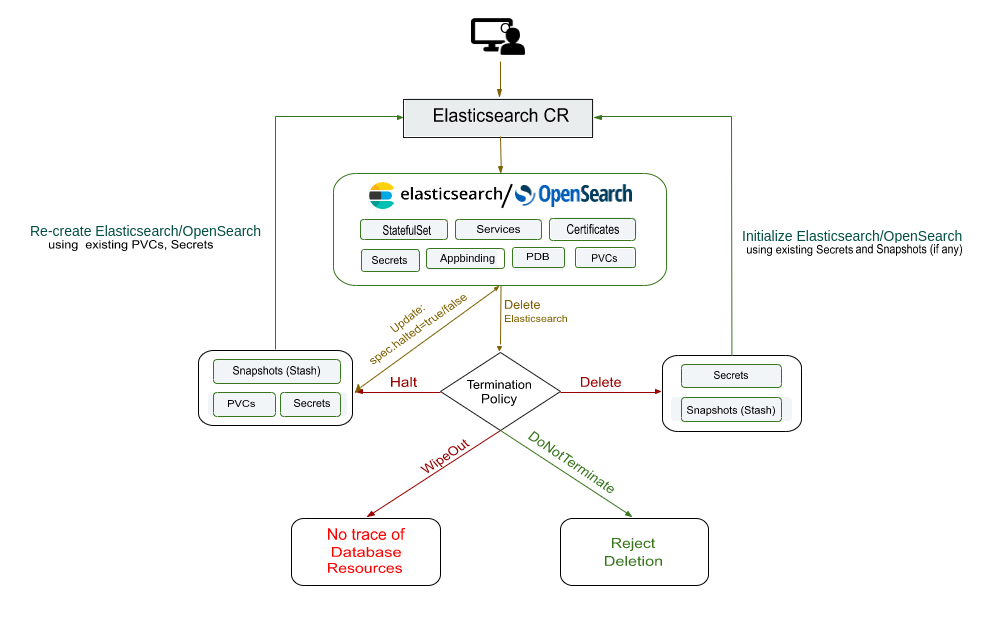
Available Elasticsearch Versions
KubeDB supports Elasticsearch provided by Elastic with xpack auth plugin. Opensearch and Opendistro are supported too. KubeDB also supports some versions of Elasticsearch with searchguard auth plugin. Compatible Kibana and Opensearch-Dashboards are supported by Most of the Elasticsearch versions with xpack auth plugin and OpenSearch. Kibana and Opensearch-Dashboards can be provisioned externally or by using KubeDB with ElasticsearchDashboard CRD.
| X-Pack | OpenSearch | |||||||||||||||||||||||||||||||||||||||||||||||||||||||||
|---|---|---|---|---|---|---|---|---|---|---|---|---|---|---|---|---|---|---|---|---|---|---|---|---|---|---|---|---|---|---|---|---|---|---|---|---|---|---|---|---|---|---|---|---|---|---|---|---|---|---|---|---|---|---|---|---|---|---|
|
|
The listed ElasticsearchVersions are tested and provided as a part of the installation process (ie. catalog chart), but you are open to create your own ElasticsearchVersion object with your custom Elasticsearch image.
User Guide
- Quickstart Elasticsearch with KubeDB Operator.
- Quickstart OpenSearch with KubeDB Operator.
- Quickstart Kibana with KubeDB Operator.
- Quickstart OpenSearch-Dashboards with KubeDB Operator.
- Elasticsearch Clustering supported by KubeDB
- Backup & Restore Elasticsearch database using Stash.
- Monitor your Elasticsearch database with KubeDB using
out-of-the-boxbuiltin-Prometheus. - Monitor your Elasticsearch database with KubeDB using
out-of-the-boxPrometheus operator. - Use private Docker registry to deploy Elasticsearch with KubeDB.
- Use kubedb cli to manage databases like kubectl for Kubernetes.
- Detail concepts of Elasticsearch object.
- Want to hack on KubeDB? Check our contribution guidelines.