









































You are looking at the documentation of a prior release. To read the documentation of the latest release, please
visit here.
New to KubeDB? Please start here.
GitOps Overview for MySQL
This guide will give you an overview of how KubeDB gitops operator works with MySQL databases using the gitops.kubedb.com/v1alpha1 API. It will help you understand the GitOps workflow for managing MySQL databases in Kubernetes.
Before You Begin
- You should be familiar with the following
KubeDBconcepts:
Workflow GitOps with MySQL
The following diagram shows how the KubeDB GitOps Operator used to sync with your database. Open the image in a new tab to see the enlarged version.
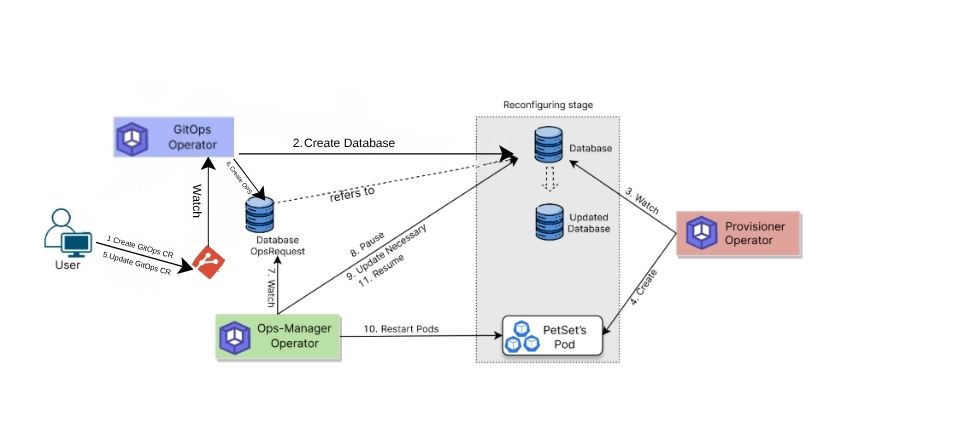
- Define GitOps MySQL: Create Custom Resource (CR) of kind
MySQLusing thegitops.kubedb.com/v1alpha1API. - Store in Git: Push the CR to a Git repository.
- Automated Deployment: Use a GitOps tool (like
ArgoCDorFluxCD) to monitor the Git repository and synchronize the state of the Kubernetes cluster with the desired state defined in Git. - Create Database: The GitOps operator creates a corresponding KubeDB MySQL CR in the Kubernetes cluster to deploy the database.
- Handle Updates: When you update the MySQLGitOps CR, the operator generates an Ops Request to safely apply the update(e.g.
VerticalScaling,HorizontalScaling,VolumeExapnsion,Reconfigure,RotateAuth,ReconfigureTLS,VersionUpdate, ansRestart.
This flow makes managing MySQL databases efficient, reliable, and fully integrated with GitOps practices.
In the next doc, we are going to show a step by step guide on running MySQL using GitOps.