









































You are looking at the documentation of a prior release. To read the documentation of the latest release, please
visit here.
New to KubeDB? Please start here.
Neo4j Cluster Architecture
Overview
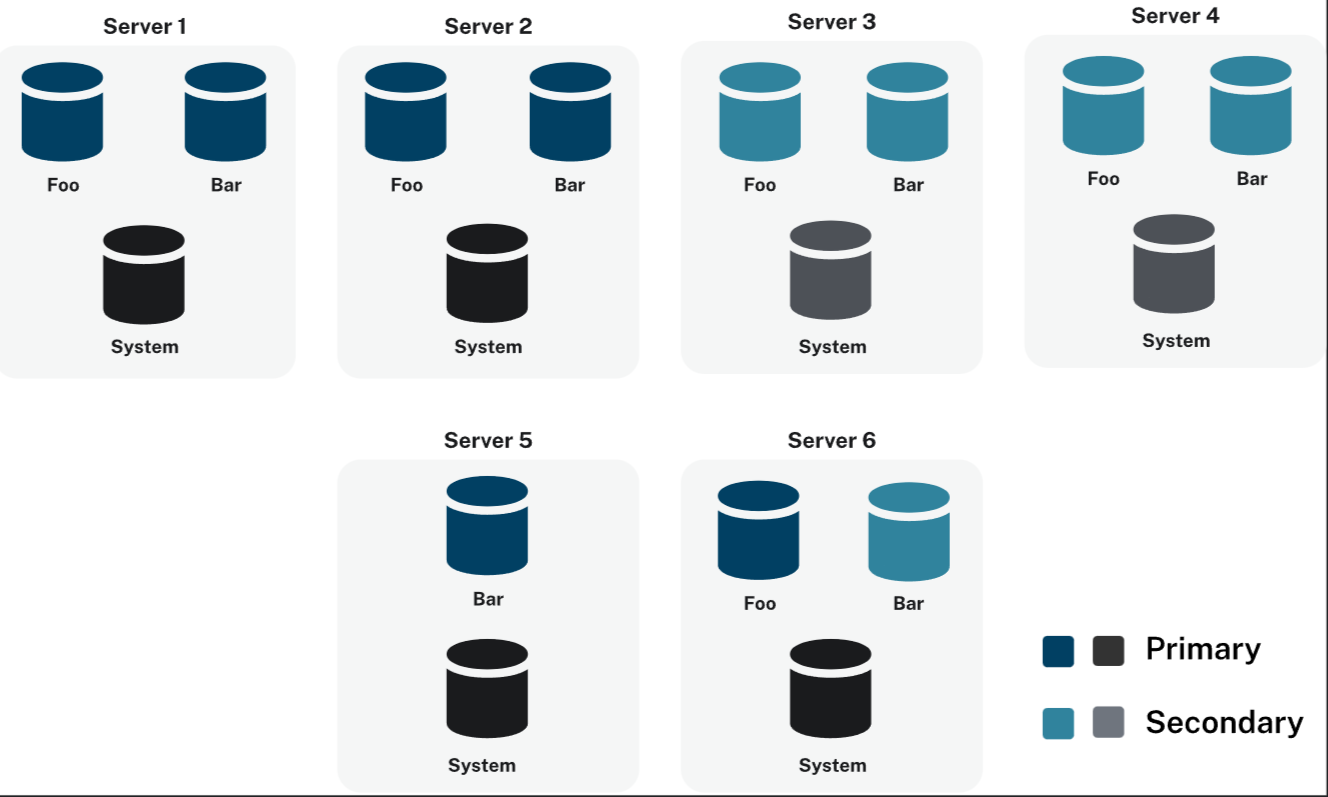
KubeDB provisions Neo4j in cluster mode using the Neo4j Cluster topology. Each Neo4j cluster is a set of server instances that cooperate to provide a fully connected, highly available, and scalable graph database. KubeDB strictly follows the modeConstraint: NONE server operating mode, which allows any server in the cluster to perform any role the cluster topology requires.
Cluster Mode: NONE Constraint
Neo4j servers can be constrained to specific roles in the cluster (primary-only, secondary-only). KubeDB does not apply any such restriction, every server is started with:
server.cluster.mode.constraint=NONE
This means:
- Each server can operate as a primary server (hosting a database copy that accepts writes and participates in Raft consensus).
- Each server can also operate as a secondary server (hosting read replicas for scale-out).
- The cluster topology engine assigns roles dynamically based on placement policies and the number of servers available.
- No server is permanently locked to a specific role, which gives maximum flexibility during scaling, version updates, and pod failures.
Operational View
The diagram above shows the operational view of a KubeDB-managed Neo4j cluster. Each pod runs a single Neo4j server instance. Kubernetes services route:
Bolt traffic(7687) to the cluster-level ClusterIP Service{neo4j-name}.HTTP Browser traffic(7474) to the same ClusterIP Service.Intra-cluster communication(7000discovery,6000transaction,7688intra-Bolt) through per-pod headless Services.
Cluster Components
Server Instances
Every Neo4j pod in a KubeDB-managed cluster is an independent server member. The cluster is formed when a quorum of servers successfully complete the discovery and Raft election phases on startup.
With spec.replicas: 3, KubeDB creates:
| Resource | Count | Purpose |
|---|---|---|
| Neo4j pods | 3 | One server process per pod |
| PVCs | 3 | Independent persistent volume per pod |
| Per-pod headless Service | 3 | Intra-cluster communication per member |
| Cluster ClusterIP Service | 1 | Client Bolt/HTTP entry point |
Discovery
Neo4j servers find each other using the per-pod headless Services ({neo4j-name}-0, {neo4j-name}-1, {neo4j-name}-2). These Services expose discovery port 6000 and transaction port 7000, which the Neo4j cluster engine uses to build its routing table.
Raft Consensus
Neo4j uses the Raft protocol to elect a leader for each database hosted in the cluster. With modeConstraint: NONE, any server is eligible to become the Raft leader for a given database. A minimum quorum of ⌊N/2⌋ + 1 servers must be available for the cluster to accept writes.
| Replicas | Fault tolerance | Write quorum needed |
|---|---|---|
| 3 | 1 server failure | 2 |
| 5 | 2 server failures | 3 |
| 7 | 3 server failures | 4 |
Database Hosting
Each logical database inside Neo4j (for example neo4j, system) has its own Raft group and its own elected leader. A 3-server cluster can host multiple databases, each with independent leaders — a server may be the write leader for one database and a follower for another.
Example: 3-Server Cluster
apiVersion: kubedb.com/v1alpha2
kind: Neo4j
metadata:
  name: neo4j-test
  namespace: demo
spec:
  replicas: 3
  version: "2025.12.1"
  storage:
    storageClassName: local-path
    accessModes:
      - ReadWriteOnce
    resources:
      requests:
        storage: 2Gi
  deletionPolicy: WipeOut
$ kubectl apply -f https://github.com/kubedb/docs/tree/v2026.6.5-rc.1/docs/examples/neo4j/quickstart/neo4j.yaml
When applied:
- KubeDB creates a PetSet with 3 replicas.
- Each pod gets its own PVC and a dedicated headless Service.
- All three Neo4j processes start, exchange discovery packets, and elect a Raft leader per database.
- Once the quorum is established,
status.phasemoves toReady.
$ kubectl get neo4j -n demo neo4j-test
NAME         VERSION     STATUS   AGE
neo4j-test   2025.12.1   Ready    3m

$ kubectl get pods -n demo -l app.kubernetes.io/instance=neo4j-test
NAME           READY   STATUS    RESTARTS   AGE
neo4j-test-0   1/1     Running   0          3m
neo4j-test-1   1/1     Running   0          2m
neo4j-test-2   1/1     Running   0          2m
Failover Behavior
When a Neo4j pod becomes unavailable (node failure, eviction, rolling update), the remaining servers detect the loss through missed heartbeats. The Raft protocol then holds a new election to select a replacement leader for any database whose current leader was lost.
What happens during a single-pod failure in a 3-server cluster:
- The lost server’s headless Service entry stops resolving.
- The remaining 2 servers detect the failure and the affected database(s) hold a Raft election.
- One of the 2 surviving servers is elected as the new write leader.
- Writes continue uninterrupted — the cluster remains above the quorum threshold of 2.
- When the failed pod restarts (Kubernetes restarts it automatically), it rejoins the cluster, catches up on missed transactions, and participates in future elections.
During a rolling version upgrade or vertical scaling, KubeDB takes pods down one at a time. Because the cluster stays above quorum throughout, client connections experience only short Bolt reconnection windows, not full unavailability.
Minimum replicas for fault tolerance: A 1-replica deployment has no fault tolerance. Use at least 3 replicas for any workload that requires high availability.
Verify Cluster Health
Once the cluster is ready, connect via cypher-shell and inspect the cluster topology:
$ PASS=$(kubectl get secret -n demo neo4j-test-auth -o jsonpath='{.data.password}' | base64 -d)

$ kubectl exec -n demo neo4j-test-0 -- \
    cypher-shell -u neo4j -p "$PASS" \
    "SHOW SERVERS YIELD serverId, name, address, state, health, hosting
     RETURN serverId, name, address, state, health, hosting;"
Expected output (3-server cluster, all Enabled and Available):
+----------------------------------------------------------------------------------------+
| serverId | name             | address                              | state    | health      | hosting  |
+----------------------------------------------------------------------------------------+
| "abc..."  | "neo4j-test-0"  | "neo4j-test-0.demo.svc...:7100"     | Enabled  | Available  | ["neo4j"] |
| "def..."  | "neo4j-test-1"  | "neo4j-test-1.demo.svc...:7100"     | Enabled  | Available  | ["neo4j"] |
| "ghi..."  | "neo4j-test-2"  | "neo4j-test-2.demo.svc...:7100"     | Enabled  | Available  | ["neo4j"] |
+----------------------------------------------------------------------------------------+
Check database allocation and current leaders:
$ kubectl exec -n demo neo4j-test-0 -- \
    cypher-shell -u neo4j -p "$PASS" \
    "SHOW DATABASES YIELD name, role, writer, currentStatus, address
     RETURN name, role, writer, currentStatus, address
     ORDER BY name, role;"
Next Steps
- Follow the Neo4j quickstart to provision your first cluster.
- Learn about horizontal scaling to add or remove cluster members.
- Learn about vertical scaling to adjust pod resources.
- Learn about TLS configuration for securing cluster communication.