









































You are looking at the documentation of a prior release. To read the documentation of the latest release, please
visit here.
New to KubeDB? Please start here.
Reconfiguring TLS of Neo4j Database
This guide gives an overview of how KubeDB Ops-manager reconfigures TLS for a Neo4j database, including adding TLS, rotating certificates, updating issuer reference, and removing TLS through Neo4jOpsRequest.
Before You Begin
- You should be familiar with Neo4j.
- You should be familiar with Neo4jOpsRequest.
How Reconfiguring Neo4j TLS Works
The following diagram shows the TLS reconfiguration flow for a Neo4j database. Open the image in a new tab to see the enlarged version.
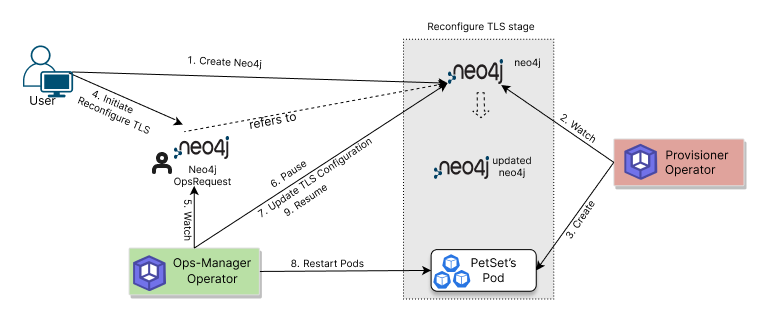
The process consists of the following steps:
- A user creates a
Neo4jCustom Resource. - KubeDB Provisioner reconciles the database and creates required workloads and secrets.
- To update TLS settings, the user creates a
Neo4jOpsRequestwithspec.type: ReconfigureTLS. - KubeDB Ops-manager watches the
Neo4jOpsRequestand validates thespec.tlsfields. - Ops-manager temporarily pauses conflicting reconciliation for the target database.
- It applies the requested TLS action (add/update via
issuerRef, rotate viarotateCertificates, or disable viaremove). - It rolls/restarts the required pods so updated TLS configuration is picked up.
- After successful checks, Ops-manager marks the request
Successfuland resumes normal reconciliation.
In the next guide, we show the step-by-step workflow for each TLS reconfiguration operation.
Next Step
- Follow: Reconfigure TLS in Neo4j.