









































You are looking at the documentation of a prior release. To read the documentation of the latest release, please
visit here.
New to KubeDB? Please start here.
Neo4j TLS/SSL Encryption
Before You Begin
To configure TLS/SSL in Neo4j, KubeDB uses cert-manager to issue certificates. Make sure cert-manager is installed in your cluster. You can install it by following the official guide here.
To issue certificates, the following cert-manager CRDs are used:
Issuer/ClusterIssuer: Represents the certificate authority used to sign certificate requests.Certificate: Describes the desired X.509 certificate that cert-manager keeps renewed.
Neo4j CRD Specification:
KubeDB uses spec.tls in the Neo4j CR to enable transport encryption.
spec.tls.issuerRef— the cert-manager Issuer or ClusterIssuer that signs Neo4j certificates.- Protocol-specific TLS settings under
spec.tls(for examplebolt,https, and cluster channels).
TLS mode reference:
| Mode | What it means |
|---|---|
TLS | Encrypts traffic. The server presents a certificate; clients do not need one. |
mTLS | Mutual TLS. Both the server and client present certificates signed by the same CA. Use this to restrict which clients can connect. |
Read field details in Neo4j concept.
How TLS/SSL is configured in Neo4j
The following figure shows the operational flow used by KubeDB to configure TLS/SSL in Neo4j.
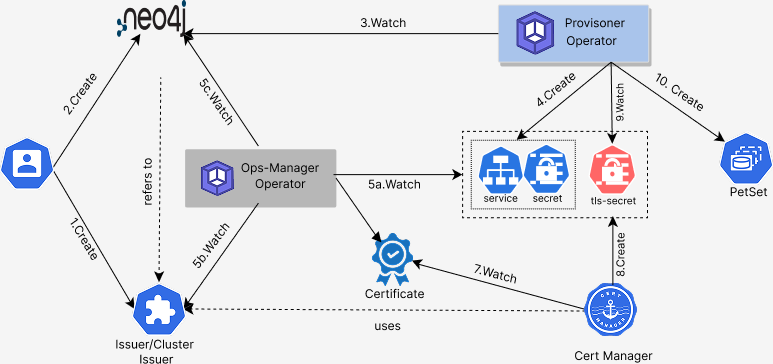
Deploying Neo4j with TLS/SSL configuration consists of the following steps:
- User creates an
Issuer/ClusterIssuer. - User creates a
Neo4jCR withspec.tls. - KubeDB operator watches the
Neo4jCR and creates required resources. - KubeDB Ops Manager detects required resources and creates
Certificateresources. - cert-manager watches
Certificateresources and issues certificate Secrets. - KubeDB reconciles Neo4j pods with issued TLS certificates mounted.
- Neo4j cluster becomes ready with encrypted transport enabled for configured protocols.
In the next document, we show a step-by-step guide for configuring a Neo4j database with TLS/SSL.