









































You are looking at the documentation of a prior release. To read the documentation of the latest release, please
visit here.
New to KubeDB? Please start here.
Reconfiguring TLS for Qdrant
This guide will give an overview of how KubeDB Ops-manager reconfigures TLS for a Qdrant database.
QdrantOpsRequest CRD Specification:
KubeDB uses the following CRD fields to reconfigure TLS in Qdrant.
spec:type: ReconfigureTLStls:issuerRefcertificatesclientp2protateCertificatesremove
Read about the fields in detail from the QdrantOpsRequest Concepts page.
Before You Begin
- You should be familiar with the following
KubeDBconcepts: - Use the example files from
docs/examples/qdrant/quickstart/distributed.yamlanddocs/examples/qdrant/reconfigure-tls/.
kubectl create ns demo
Deploy Qdrant
kubectl apply -f https://github.com/kubedb/docs/raw/v2026.6.5-rc.1/docs/examples/qdrant/quickstart/distributed.yaml
kubectl get qdrant -n demo qdrant-sample -w
How Reconfigure TLS Works
The following figure shows how KubeDB reconfigures TLS in Qdrant. Open the image in a new tab to see the enlarged version.
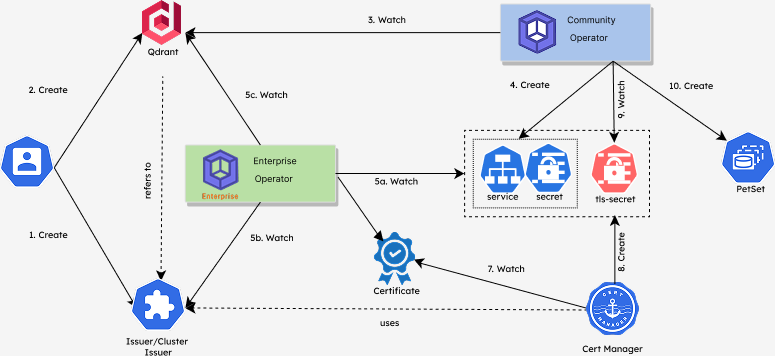
The Reconfigure TLS process consists of the following steps:
At first, a user creates a
QdrantCR.KubeDB-Provisioneroperator watches theQdrantCR.When the operator finds a
QdrantCR, it creates aPetSetand related necessary resources like secrets, services, etc.Then, in order to reconfigure TLS of the
Qdrantdatabase, the user creates aQdrantOpsRequestCR specifying the desired TLS configuration. The user can add TLS to an existing non-TLS database, rotate the existing certificates, change the issuer, or remove TLS entirely.KubeDBOps-manager operator watches theQdrantOpsRequestCR.When it finds a
QdrantOpsRequestCR, it pauses theQdrantobject so that theKubeDB-Provisioneroperator doesn’t perform any operations on theQdrantduring the TLS reconfiguration process.Then the
KubeDBOps-manager operator updates the TLS secrets and restarts the pods in a rolling fashion with the new TLS configuration.After the successful TLS reconfiguration, the
KubeDBOps-manager updates theQdrantobject to reflect the updated TLS state.After the successful Reconfigure TLS, the
KubeDBOps-manager resumes theQdrantobject so that theKubeDB-Provisionerresumes its usual operations.
KubeDB supports the following TLS reconfiguration operations for Qdrant:
- Add TLS — Enable TLS on an existing non-TLS Qdrant database.
- Rotate TLS — Rotate the existing TLS certificates to refresh expiring certificates.
- Remove TLS — Remove TLS from an existing TLS-enabled Qdrant database.
In the next doc, we are going to show a step-by-step guide on reconfiguring TLS for a Qdrant database using QdrantOpsRequest CRD.