









































You are looking at the documentation of a prior release. To read the documentation of the latest release, please
visit here.
New to KubeDB? Please start here.
Qdrant Volume Expansion
This guide will give an overview of how KubeDB Ops-manager expands the volume of a Qdrant database.
Before You Begin
- You should be familiar with the following
KubeDBconcepts:
How Volume Expansion Process Works
The following diagram shows how KubeDB Ops Manager expand the volumes of Qdrant database components. Open the image in a new tab to see the enlarged version.
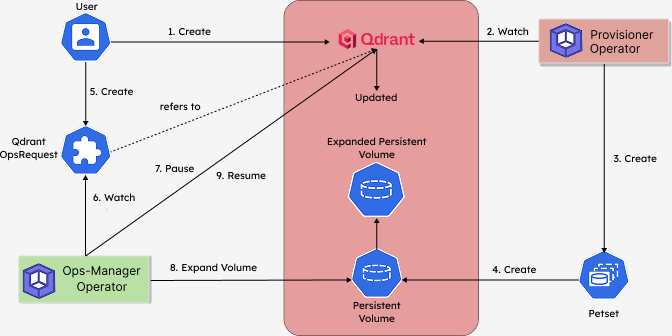
The Volume Expansion process consists of the following steps:
At first, a user creates a
QdrantCustom Resource (CR).KubeDB-Provisioneroperator watches theQdrantCR.When the operator finds a
QdrantCR, it creates aPetsetand related necessary stuff like pods, PVCs, secrets, services, etc.Each Petset creates a Persistent Volume according to the volume claim template. This Persistent Volume will be expanded by the
KubeDBOps-manager operator.Then, in order to expand the volume of the
Qdrantdatabase, the user creates aQdrantOpsRequestCR with the desired new storage size.KubeDBOps-manager operator watches theQdrantOpsRequestCR.When it finds a
QdrantOpsRequestCR, it pauses theQdrantobject so that theKubeDB-Provisioneroperator doesn’t perform any operations on theQdrantduring the volume expansion process.Then the
KubeDBOps-manager operator expands the persistent volumes to the expected size defined in theQdrantOpsRequestCR.After the successful expansion of the volumes, the
KubeDBOps-manager updates the new volume size in theQdrantobject to reflect the updated state.After the successful Volume Expansion, the
KubeDBOps-manager resumes theQdrantobject so that theKubeDB-Provisionerresumes its usual operations.
In the next doc, we are going to show a step-by-step guide on Volume Expansion of a Qdrant database using QdrantOpsRequest CRD.