









































You are looking at the documentation of a prior release. To read the documentation of the latest release, please
visit here.
New to KubeDB? Please start here.
MariaDB Vertical Scaling
This guide will give an overview on how KubeDB Ops Manager vertically scales up MariaDB.
Before You Begin
- You should be familiar with the following
KubeDBconcepts:
How Vertical Scaling Process Works
The following diagram shows how KubeDB Ops Manager scales up or down MariaDB database components. Open the image in a new tab to see the enlarged version.
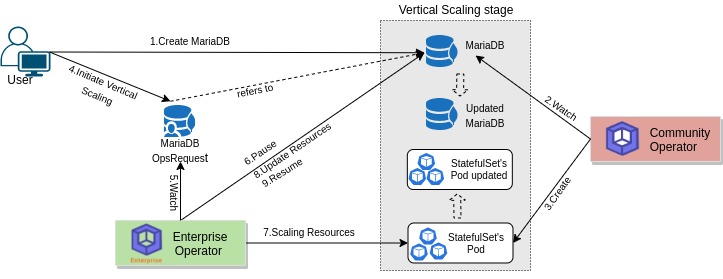
The vertical scaling process consists of the following steps:
At first, a user creates a
MariaDBCustom Resource (CR).KubeDBCommunity operator watches theMariaDBCR.When the operator finds a
MariaDBCR, it creates required number ofPetSetsand related necessary stuff like secrets, services, etc.Then, in order to update the resources(for example
CPU,Memoryetc.) of theMariaDBdatabase the user creates aMariaDBOpsRequestCR with desired information.KubeDBEnterprise operator watches theMariaDBOpsRequestCR.When it finds a
MariaDBOpsRequestCR, it halts theMariaDBobject which is referred from theMariaDBOpsRequest. So, theKubeDBCommunity operator doesn’t perform any operations on theMariaDBobject during the vertical scaling process.Then the
KubeDBEnterprise operator will update resources of the PetSet Pods to reach desired state.After the successful update of the resources of the PetSet’s replica, the
KubeDBEnterprise operator updates theMariaDBobject to reflect the updated state.After the successful update of the
MariaDBresources, theKubeDBEnterprise operator resumes theMariaDBobject so that theKubeDBCommunity operator resumes its usual operations.
Vertical Scaling Modes
KubeDB actuates vertical scaling in one of two modes, selected through the spec.verticalScaling.mode
field of the MariaDBOpsRequest:
Restart(default): The operator patches thePetSetwith the new resources and restarts the Pods (one at a time, honoring the database’s failover rules) so they come back with the updated CPU and Memory. This works on every Kubernetes cluster.InPlace: The operator resizes the running containers in place using the Kubernetes in-place Pod resize (pods/resizesubresource) — no Pod restart, so scaling happens without downtime or failover. If a Node cannot accommodate the new resources (the resize is reportedInfeasible), the operator automatically falls back to theRestartbehavior for that Pod. For a distributedMariaDBdeployment, in-place resize is not possible, soInPlaceautomatically degrades toRestart.
If spec.verticalScaling.mode is omitted, it defaults to Restart.
Note:
InPlacemode relies on the KubernetesInPlacePodVerticalScalingfeature gate, which is enabled by default from Kubernetes v1.33. On older clusters, or when the feature gate is disabled, useRestartmode.
In the next docs, we are going to show a step by step guide on updating resources of MariaDB database using MariaDBOpsRequest CRD.